
Recap of the previous chapter: State Recording
- You learned how to record and restore operations through State.
- You became comfortable using the methods and events related to State.
In this chapter you will learn
- An introduction to the Five SDK event system.
- How to obtain the 3D position of a point.
Preparation
We create a new directory (src/4.points-in-3d) together with the corresponding html file and a jsx or tsx file. Carrying over the State code from the previous chapter would be too cumbersome, so we will build on top of the content from the Displaying 3D Space chapter instead.
<!DOCTYPE html>
<html lang="en">
  <head>
    <meta charset="UTF-8" />
    <link rel="icon" href="data:;base64,iVBORw0KGgo=" />
    <meta name="viewport" content="width=device-width, initial-scale=1.0" />
    <title>Points in 3D</title>
    <style>
      * {
        margin: 0;
        padding: 0;
      }
      html,
      body #app {
        width: 100%;
        height: 100%;
        overflow: hidden;
      }
    </style>
  </head>
  <body>
    <div id="app"></div>
    <script type="module" src="./index"></script>
  </body>
</html>import { useState, useEffect } from "react";
import { parseWork } from "@realsee/five";
/**
* React Hook: fetch the work object from a work.json URL
* @param url the data URL of work.json
* @returns the work object; returns null while fetching
*/
function useFetchWork(url) {
const [work, setWork] = useState(null);
useEffect(() => {
setWork(null);
fetch(url)
.then((response) => response.text())
.then((text) => setWork(parseWork(text)));
}, [url]);
return work;
}
export { useFetchWork };import { useState, useEffect } from "react";
/**
* Get the current window dimensions
*/
function getWindowDimensions() {
return { width: window.innerWidth, height: window.innerHeight };
}
/**
* React Hook: get the current window dimensions
*/
function useWindowDimensions() {
const [size, setSize] = useState(getWindowDimensions);
useEffect(() => {
const listener = () => setSize(getWindowDimensions());
window.addEventListener("resize", listener, false);
return () => window.removeEventListener("resize", listener, false);
});
return size;
}
export { useWindowDimensions };import React from "react";
import { Five } from "@realsee/five";
import { useFiveCurrentState } from "@realsee/five/react";
import BottomNavigation from "@mui/material/BottomNavigation";
import BottomNavigationAction from "@mui/material/BottomNavigationAction";
import Paper from "@mui/material/Paper";
import DirectionsWalkIcon from "@mui/icons-material/DirectionsWalk";
import ViewInArIcon from "@mui/icons-material/ViewInAr";
/**
* React Component: mode controller
*/
const ModeController = () => {
const [state, setState] = useFiveCurrentState();
return (
<Paper sx={{ position: "fixed", bottom: 0, left: 0, right: 0 }}>
<BottomNavigation
showLabels
value={state.mode}
onChange={(_, newValue) => {
setState({ mode: newValue });
}}
>
<BottomNavigationAction
label="Panorama Walkthrough"
icon={<DirectionsWalkIcon />}
value={Five.Mode.Panorama}
/>
<BottomNavigationAction
label="Space Overview"
icon={<ViewInArIcon />}
value={Five.Mode.Floorplan}
/>
</BottomNavigation>
</Paper>
);
};
export { ModeController };import React from "react";
import { createFiveProvider, FiveCanvas } from "@realsee/five/react";
import { useFetchWork } from "./useFetchWork";
import { useWindowDimensions } from "./useWindowDimensions";
import { ModeController } from "./ModeController";
/** The data URL of work.json */
const workURL =
"https://vr-public.realsee-cdn.cn/release/static/image/release/five/work-sample/07bdc58f413bc5494f05c7cbb5cbdce4/work.json";
const FiveProvider = createFiveProvider();
const App = () => {
const work = useFetchWork(workURL);
const size = useWindowDimensions();
return (
work && (
<FiveProvider initialWork={work}>
<FiveCanvas {...size} />
<ModeController />
</FiveProvider>
)
);
};
export { App };import React from "react";
import ReactDOM from "react-dom";
import { App } from "./App";
ReactDOM.render(<App />, document.querySelector("#app"));
export {};import { useState, useEffect } from "react";
import { Work, parseWork } from "@realsee/five";
/**
* React Hook: fetch the work object from a work.json URL
* @param url the data URL of work.json
* @returns the work object; returns null while fetching
*/
function useFetchWork(url: string) {
const [work, setWork] = useState<Work | null>(null);
useEffect(() => {
setWork(null);
fetch(url)
.then((response) => response.text())
.then((text) => setWork(parseWork(text)));
}, [url]);
return work;
}
export { useFetchWork };import { useState, useEffect } from "react";
/**
* Get the current window dimensions
*/
function getWindowDimensions() {
return { width: window.innerWidth, height: window.innerHeight };
}
/**
* React Hook: get the current window dimensions
*/
function useWindowDimensions() {
const [size, setSize] = useState(getWindowDimensions);
useEffect(() => {
const listener = () => setSize(getWindowDimensions());
window.addEventListener("resize", listener, false);
return () => window.removeEventListener("resize", listener, false);
});
return size;
}
export { useWindowDimensions };import React, { FC } from "react";
import { Five, Mode } from "@realsee/five";
import { useFiveCurrentState } from "@realsee/five/react";
import BottomNavigation from "@mui/material/BottomNavigation";
import BottomNavigationAction from "@mui/material/BottomNavigationAction";
import Paper from "@mui/material/Paper";
import DirectionsWalkIcon from "@mui/icons-material/DirectionsWalk";
import ViewInArIcon from "@mui/icons-material/ViewInAr";
/**
* React Component: mode controller
*/
const ModeController: FC = () => {
const [state, setState] = useFiveCurrentState();
return (
<Paper sx={{ position: "fixed", bottom: 0, left: 0, right: 0 }}>
<BottomNavigation
showLabels
value={state.mode}
onChange={(_, newValue: Mode) => {
setState({ mode: newValue });
}}
>
<BottomNavigationAction
label="Panorama Walkthrough"
icon={<DirectionsWalkIcon />}
value={Five.Mode.Panorama}
/>
<BottomNavigationAction
label="Space Overview"
icon={<ViewInArIcon />}
value={Five.Mode.Floorplan}
/>
</BottomNavigation>
</Paper>
);
};
export { ModeController };import React, { FC } from "react";
import { createFiveProvider, FiveCanvas } from "@realsee/five/react";
import { useFetchWork } from "./useFetchWork";
import { useWindowDimensions } from "./useWindowDimensions";
import { ModeController } from "./ModeController";
/** The data URL of work.json */
const workURL =
"https://vr-public.realsee-cdn.cn/release/static/image/release/five/work-sample/07bdc58f413bc5494f05c7cbb5cbdce4/work.json";
const FiveProvider = createFiveProvider();
const App: FC = () => {
const work = useFetchWork(workURL);
const size = useWindowDimensions();
return (
work && (
<FiveProvider initialWork={work}>
<FiveCanvas {...size} />
<ModeController />
</FiveProvider>
)
);
};
export { App };import React from "react";
import ReactDOM from "react-dom";
import { App } from "./App";
ReactDOM.render(<App />, document.querySelector("#app"));
export {};Start the dev server with npm run dev, then navigate to the current page at "http://localhost:3000/src/4.points-in-3d/index.html".
Info
Check your console: the port number may change depending on your configuration and which ports are currently in use, so always rely on the console output. If you are using a different development/build tool, start the server according to that tool's requirements.
Event System
When you click on the screen, the default behavior of the Five SDK is to select the most suitable observer near the clicked location and move to it. Most user actions work this way, much like how a browser handles anchor (A) tags mostly as link navigation. This is the Five SDK's built-in tapGesture event.
Built-in Events
The Five SDK has the following built-in events:
- tapGesture: a left mouse-button click or a finger tap. The default behavior is moving to an observer point.
- panGesture: holding down the mouse button or dragging a finger across the screen. Rotates the camera (in Topview it translates the camera).
- pinchGesture: a two-finger pinch gesture. The default behavior is to change the camera's field of view.
- mouseWheel: the mouse wheel. The default behavior is to change the camera's field of view.
- gesture: any of the events above.
Preventing the Default Behavior
Just like a browser's handling of anchor (A) tags, every event lets you prevent its default behavior. You only need to listen to the event whose name starts with wants and return false inside the callback. For example, to prevent the default observer-move behavior of tapGesture, you can do the following.
useFiveEventCallback("wantsTapGesture", () => {
  // highlight-start
  // Prevent tapGesture from firing
  return false;
  // highlight-end
});
For the detailed API of each event, see the full documentation:
Obtaining Coordinates from tapGesture
We will build a simple feature that marks the 3D position you click on the canvas.
To avoid conflicting with the observer-move feature, we use a
Switchbutton to control whether marking mode is enabled.
Adding the Dependency
This chapter requires a brief introduction to three.js. three.js is a 3D graphics library, and the Five SDK uses three.js's math library and renderer. This chapter involves two pieces of three.js, which we explain here. You do not need to fully understand three.js; the following explanations are enough.
- `THREE.Vector3`: you can simply think of it as a
{ x: number, y: number, z: number }struct with some extra math methods (we won't use the math methods here, we only record xyz). - `THREE.Raycaster`: the ray-casting class. You can simply understand it as: a point on the screen corresponds to a ray in 3D space.
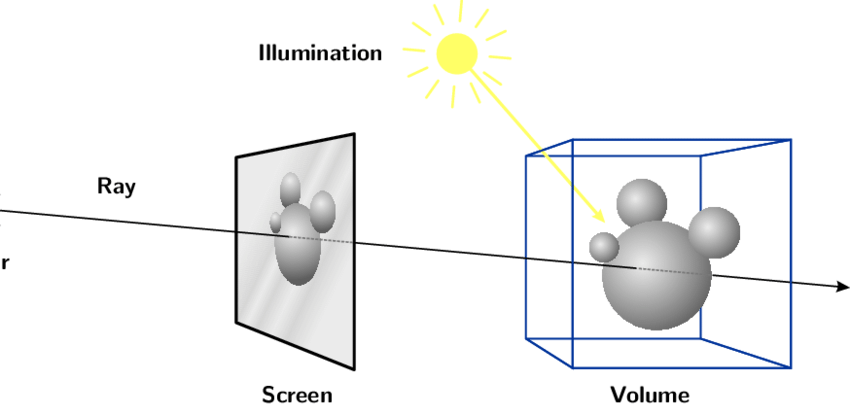
Rays have many uses. For example, by testing the intersection between a ray and a model, you can determine whether an object is selected.
Writing the MarkController Component
- Add a MarkController file to write the component.
- We use the active React state to control whether the application is currently in marking mode.
- The first argument of
tapGestureis araycaster. Passing it tomodelIntersectRaycastergives you the intersection infointersect, andintersect.pointis the coordinate of the intersection point. - We use the marks React state to store all intersection points, implementing both collection and deletion.
/**
 * React Component: mark coordinate points
 */
import React, { useState, useEffect } from "react";
import {
  useFiveEventCallback,
  useFiveModelIntersectRaycaster,
} from "@realsee/five/react";
import Button from "@mui/material/Button";
import Switch from "@mui/material/Switch";
import Chip from "@mui/material/Chip";
import Stack from "@mui/material/Stack";
import Paper from "@mui/material/Paper";

/**
 * React Component: mark coordinate points
 */
const MarkController = () => {
  const [active, toggleActive] = useState(false);
  const [marks, setMarks] = useState([]);
  const modelIntersectRaycaster = useFiveModelIntersectRaycaster();
  useFiveEventCallback(
    "wantsTapGesture",
    (raycaster) => {
      if (active) {
        const [intersect] = modelIntersectRaycaster(raycaster);
        if (intersect) setMarks((marks) => marks.concat(intersect.point));
        return false;
      }
    },
    [active]
  );
  return (
    <Paper sx={{ position: "fixed", top: 10, left: 10, padding: 1 }}>
      <Stack>
        <Stack direction="row">
          <Switch
            checked={active}
            onChange={(event, checked) => toggleActive(checked)}
          />{" "}
          <Button disabled>Enable click-to-record coordinates</Button>
        </Stack>
        <Stack spacing={1}>
          {marks.map((point, index) => {
            const { x, y, z } = point;
            return (
              <Chip
                key={index}
                label={`x=${x.toFixed(2)} y=${y.toFixed(2)} z=${z.toFixed(2)}`}
                onDelete={() =>
                  setMarks((marks) =>
                    marks.filter((_, index_) => index_ !== index)
                  )
                }
              />
            );
          })}
        </Stack>
      </Stack>
    </Paper>
  );
};

export { MarkController };import * as THREE from "three";
import React, { FC, useState, useEffect } from "react";
import {
useFiveEventCallback,
useFiveModelIntersectRaycaster,
} from "@realsee/five/react";
import Button from "@mui/material/Button";
import Switch from "@mui/material/Switch";
import Chip from "@mui/material/Chip";
import Stack from "@mui/material/Stack";
import Paper from "@mui/material/Paper";
/**
* React Component: mark coordinate points
*/
const MarkController: FC = () => {
const [active, toggleActive] = useState(false);
const [marks, setMarks] = useState<THREE.Vector3[]>([]);
const modelIntersectRaycaster = useFiveModelIntersectRaycaster();
useFiveEventCallback(
"wantsTapGesture",
(raycaster) => {
if (active) {
const [intersect] = modelIntersectRaycaster(raycaster);
if (intersect) setMarks((marks) => marks.concat(intersect.point));
return false;
}
},
[active]
);
return (
<Paper sx={{ position: "fixed", top: 10, left: 10, padding: 1 }}>
<Stack>
<Stack direction="row">
<Switch
checked={active}
onChange={(event, checked) => toggleActive(checked)}
/>{" "}
<Button disabled>Enable click-to-record coordinates</Button>
</Stack>
<Stack spacing={1}>
{marks.map((point, index) => {
const { x, y, z } = point;
return (
<Chip
key={index}
label={`x=${x.toFixed(2)} y=${y.toFixed(2)} z=${z.toFixed(2)}`}
onDelete={() =>
setMarks((marks) =>
marks.filter((_, index_) => index_ !== index)
)
}
/>
);
})}
</Stack>
</Stack>
</Paper>
);
};
export { MarkController };Using the Mark Component
Insert it into the FiveProvider in the App file.
import React from "react";
import { createFiveProvider, FiveCanvas } from "@realsee/five/react";
import { useFetchWork } from "./useFetchWork";
import { useWindowDimensions } from "./useWindowDimensions";
import { ModeController } from "./ModeController";
// highlight-start
import { MarkController } from "./MarkController";
// highlight-end

/** The data URL of work.json */
const workURL =
  "https://vr-public.realsee-cdn.cn/release/static/image/release/five/work-sample/07bdc58f413bc5494f05c7cbb5cbdce4/work.json";

const FiveProvider = createFiveProvider();
const App = () => {
  const work = useFetchWork(workURL);
  const size = useWindowDimensions();
  return (
    work && (
      <FiveProvider initialWork={work}>
        <FiveCanvas {...size} />
        <ModeController />
        // highlight-start
        <MarkController />
        // highlight-end
      </FiveProvider>
    )
  );
};

export { App };import React, { FC } from "react";
import { createFiveProvider, FiveCanvas } from "@realsee/five/react";
import { useFetchWork } from "./useFetchWork";
import { useWindowDimensions } from "./useWindowDimensions";
import { ModeController } from "./ModeController";
// highlight-start
import { MarkController } from "./MarkController";
// highlight-end
/** The data URL of work.json */
const workURL =
"https://vr-public.realsee-cdn.cn/release/static/image/release/five/work-sample/07bdc58f413bc5494f05c7cbb5cbdce4/work.json";
const FiveProvider = createFiveProvider();
const App: FC = () => {
const work = useFetchWork(workURL);
const size = useWindowDimensions();
return (
work && (
<FiveProvider initialWork={work}>
<FiveCanvas {...size} />
<ModeController />
// highlight-start
<MarkController />
// highlight-end
</FiveProvider>
)
);
};
export { App };Go back to your browser. You will notice a toggle switch in the top-left corner of the page. Turn the switch on and click on the canvas content, and it will output the coordinates of the clicked location.
Great — you've quickly understood and obtained 3D coordinates 🥳.
What You Will Learn in the Next Chapter
In the next chapter we will implement a spatial tag feature. Don't miss it.