
Overview
With Spatial Text ( PanoTextLabel ) you can place text at a three-dimensional coordinate point within a Realsee 3D model space.
Preview
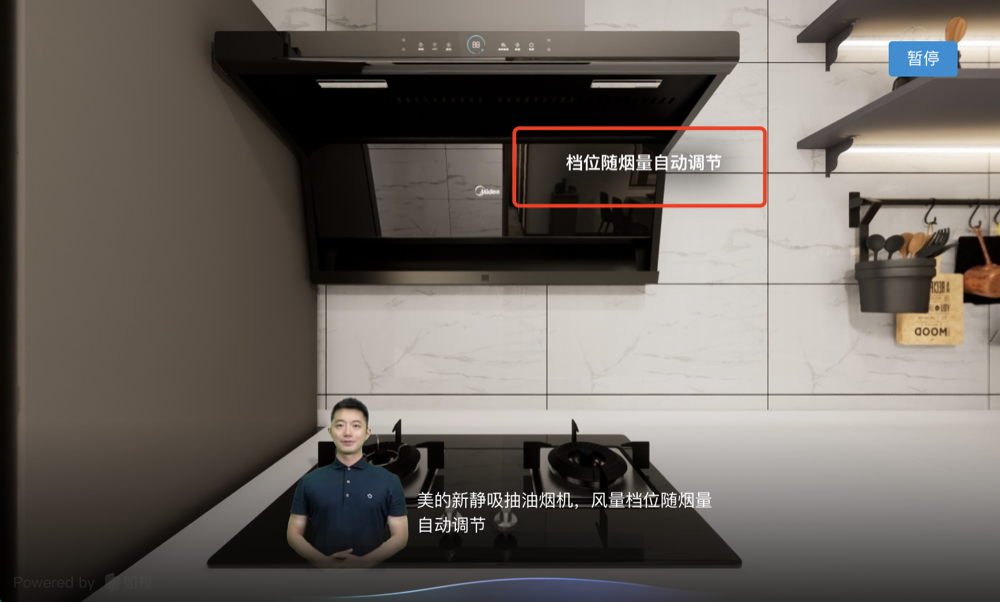
Usage
To use the spatial text capability, you need to provide the text content to display and the three-dimensional coordinate point at which to place the text.
Field Reference
/**
 * Panorama text label
 */
export type PanoTextLabelData = {
  text: string; // The text content to display within the space.
  vertex: Vertex; // The three-dimensional coordinate point at which the text is displayed within the space.
  fontSize?: number; // Optional field. Sets the text font size; defaults to 16px.
};{
"uuid": "eb7b3d3e-5f13-423d-8270-c4bfa4201d0b",
"type": "PanoTextLabel",
"start": 71200,
"end": 73200,
"parsed": false,
"data": {
"text": "Fan speed adjusts automatically with smoke volume",
"vertex": {
"x": -2.1652547611365116,
"y": 1.612348936240625,
"z": -8.787925732476422
},
"fontSize": 14
}
}