
Tip
The Floorplan plugins abstract a two-dimensional floorplan interaction layer on top of a property's 3D model, providing a more precise and intuitive 2D view of information such as the unit layout, area, orientation, load-bearing walls, and entrance door.
Three plugins are currently provided, each targeting a different usage scenario:
- [PanoFloorplanRadarPlugin] Panorama floorplan radar plugin
- [ModelFloorplanPlugin] Model floorplan plugin
- [TopviewFloorplanPlugin] Top-view model floorplan plugin
The Floorplan plugins complement the property's 3D model. You can choose the plugin that best fits your actual business needs.
Dependencies
Tip
🌟 Please note: the floorplan plugins have a hard dependency on floorplan data!!! 🌟
Features
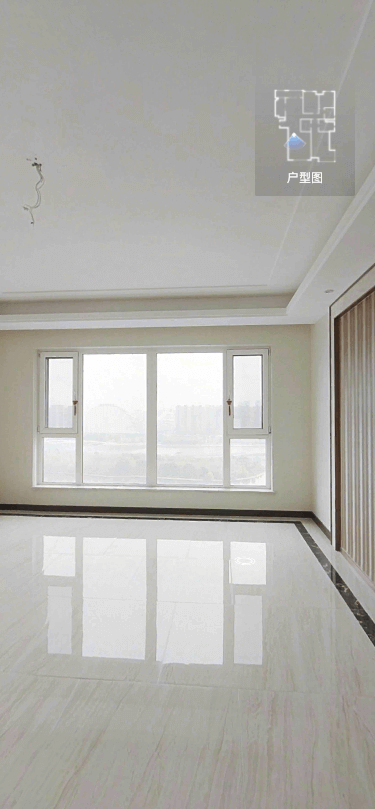
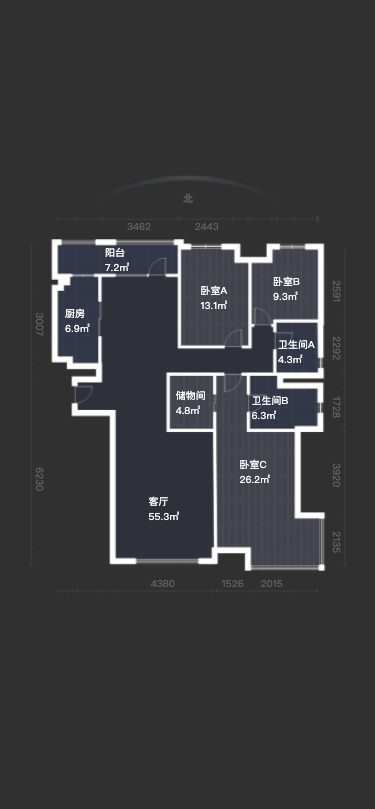
Floorplans are typically displayed in two scenarios: a radar map while browsing the property's panoramas (first image above), and a detailed floorplan while viewing the property's 3D model (second image above).
Choosing a Plugin
If you want to display the floorplan in the property's panorama-point mode, use the [PanoFloorplanRadarPlugin] panorama floorplan radar plugin, which produces an effect similar to the first image above.
For displaying the floorplan in the property's 3D model mode, there are currently two options:
- If your use case is fairly complex and you want richer feature support, choose the [ModelFloorplanPlugin] model floorplan plugin.
- If your use case is relatively simple and you want a quick integration, choose the [TopviewFloorplanPlugin] top-view model floorplan plugin.
The overall effect of both plugins is similar to the second image above. The differences between them are:
- [ModelFloorplanPlugin] supports automatically switching to model mode when you swipe on the floorplan. It also offers more diverse configuration parameters when displaying the floorplan, and the transitions are smoother.
- [TopviewFloorplanPlugin] can listen for changes in the
Fiveinstance's state and automatically show and hide itself, so there is no need to make explicitplugin.show()andplugin.hide()calls.