
PanoCompassPlugin
Overview
PanoCompassPlugin provides the ability to render a directional compass dial in panorama mode.
Demo
Drag the VR view so the camera faces the ground to see the effect.
Open the official PanoCompassPlugin demo.
Installation
import { PanoCompassPlugin } from "@realsee/dnalogel"Development Guide
Initialization
When initializing the Five instance, simply add PanoCompassPlugin to the initialization plugins parameter.
import { Five } from '@realsee/five'
import { PanoCompassPlugin } from "@realsee/dnalogel";

const five = new Five({
    plugins: [
        [
            PanoCompassPlugin,
            'panoCompassPlugin', // Custom plugin name
            {
                // compassImageUrl: '' // Configure the compass dial image
            }
        ]
    ]
})
Loading Data
You must load the data that identifies north in order to see the correct result:
// The north direction comes from the floorplan data
const NORTH_RAD = floorplanServerData?.computed_data?.entrance?.north_rad
// Load the north direction data
five.plugins.panoCompassPlugin.load({ north_rad: NORTH_RAD })
Parameters
The compassImageUrl parameter configures the image used for the compass dial. The plugin's default compass dial is shown in the demo above. If you want to replace it, make sure the image's directional layout follows: north at the top, south at the bottom, west on the left, east on the right.
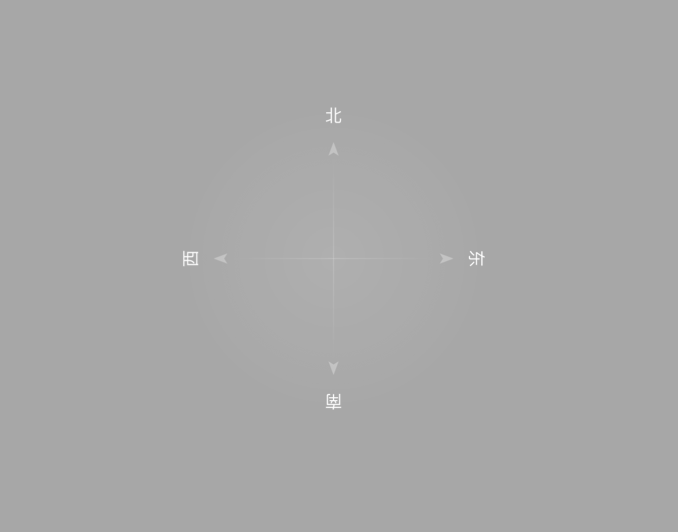
The reference asset comes from the Domestic docs and uses localized cardinal labels. Supply an English dial through compassImageUrl for an overseas-facing interface.