
PanoRulerPlugin
Info
The panorama ruler relies on the Realsee OpenAPI to obtain ruler data. See the OpenAPI documentation to learn how to retrieve panorama ruler data. The OpenAPI endpoint for panorama ruler data is: /open/v1/entity/pano_ruler/plugin
Overview
The Panorama Ruler plugin annotates the dimensions of a property's key outlines in panorama mode.
Detailed features:
- Annotates the dimensions of a property's key outlines in panorama mode, such as the ceiling height, width, and depth of each room. Both real-scene VR and virtual-scene VR scenarios are supported.
- Only displays the ruler lines closest to the center of the current viewing angle.
- As you move between points or change the viewing angle, the ruler lines follow the movement and transformation.
- Adaptive value bubble length: the bubble length adapts to the value content, and the value content can also be configured for special requirements, such as when values need an inch unit.
- If a ruler line is shorter than that ruler's value bubble, the ruler line is not displayed.
External Demo
Open the PanoRulerPlugin demo to try the plugin outside this documentation page.
Installation
Choose either yarn or npm as needed:
npm install @realsee/dnalogelImport via ES modules:
import { PanoRulerPlugin } from "@realsee/dnalogel"Development Guide
Initialization
When initializing the Five instance, pass PanoRulerPlugin in the initialization plugin parameters.
import { Five } from '@realsee/five'
import { PanoRulerPlugin } from "@realsee/dnalogel";

const five = new Five({
    plugins: [
        [
            PanoRulerPlugin,
            'panoRulerPlugin', // Custom plugin name
            {
                // Parameter configuration
            }
        ]
    ]
})
React Initialization
When creating the FiveProvider, pass PanoRulerPlugin in the initialization plugin parameters.
import { PanoRulerPlugin } from "@realsee/dnalogel";
import { createFiveProvider, FiveCanvas } from "@realsee/five/react";

const FiveProvider = createFiveProvider({
    plugins: [
        [
            PanoRulerPlugin,
            'panoRulerPlugin', // Custom plugin name
            {
                // Parameter configuration
            }
        ]
    ]
});
Vue Initialization
When using the FiveProvider, pass PanoRulerPlugin in the initialization plugin parameters.
<template>
  <FiveProvider :fiveInitArgs="fiveInitArgs">
  </FiveProvider>
</template>
<script setup>
import PanoRulerPlugin from "@realsee/dnalogel/libs/PanoRulerPlugin";
import { FiveProvider, FiveCanvas } from "@realsee/five/vue";
const fiveInitArgs = {
    plugins: [
        [
            PanoRulerPlugin,
            'panoRulerPlugin', // Custom plugin name
            {
                // compassImageUrl: '' // Configure the compass image
            }
        ]
    ]
}
</script>
Loading Data
// Get the plugin instance, where `panoRulerPlugin` is the custom name set during initialization
const pluginInstance = five.plugins.panoRulerPlugin

// Call the `load` method to load the panorama ruler data
pluginInstance.load(roomInfo, roomRules, { distanceText: (distance) => `approx. ${distance.toFixed(1)} m` })
Tip
About distanceText:
The default output unit for Realsee ruler data is m (meters). If you need a different unit, you can pass the distanceText callback to change the unit description and add unified description text. Using centimeters as an example:
pluginInstance.load(roomInfo, roomRules, { distanceText: (distance) => `approx. ${(distance * 100).toFixed(2)} cm` })You need to multiply the callback parameter distance by 100 (i.e. distance * 100) to convert meters to centimeters. toFixed() sets the number of decimal places to retain.
Result: 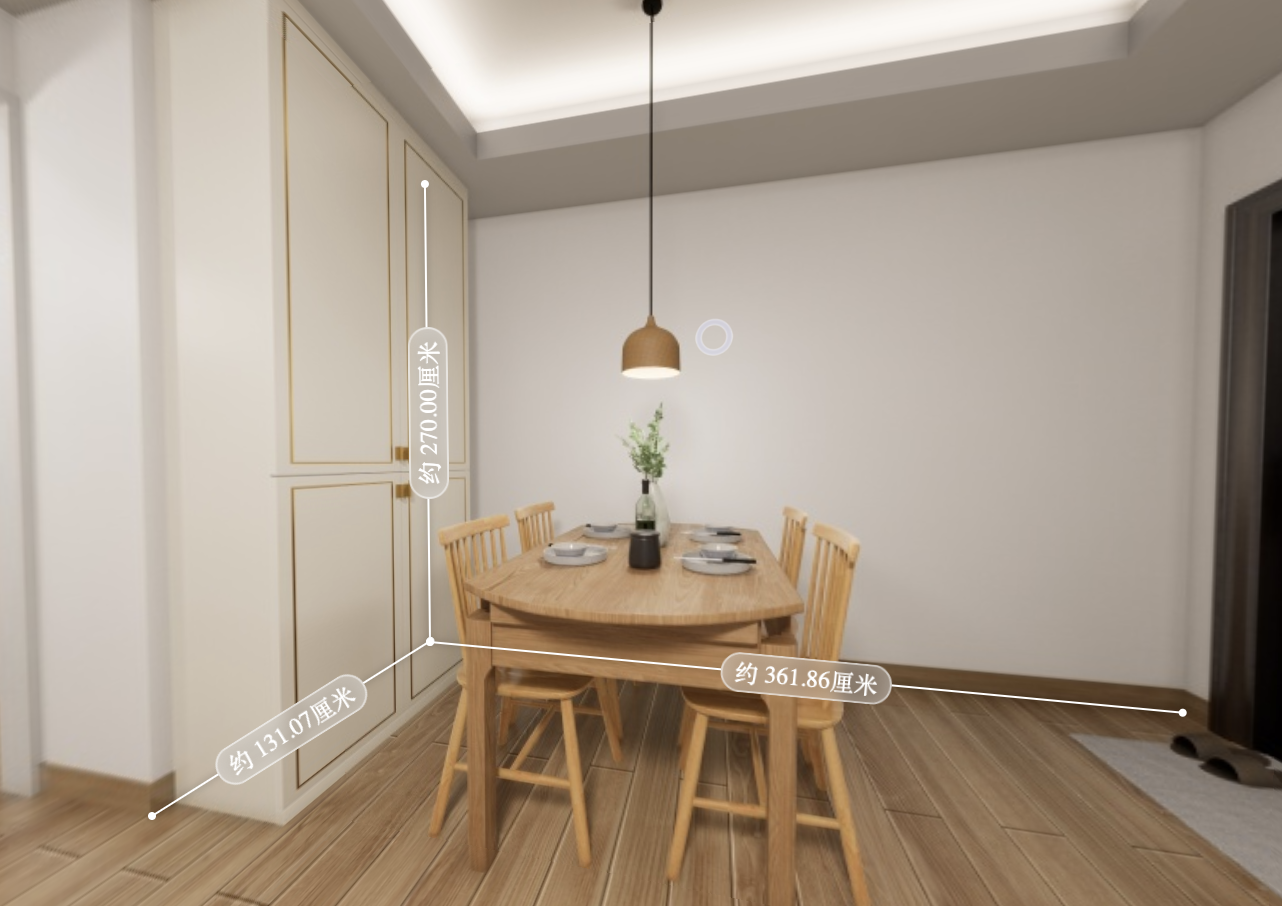
Core Methods
load: (roomInfo?: RoomInfo, roomRules?: RoomRules, options?: PanoRulerPluginOptions) => Promise<boolean>— Load the plugin data.
You need to load the plugin data manually. For the data source, see the OpenAPI documentation.
enable: () => void— Turn on the ruler.disable: () => void— Turn off the ruler.