
Tip
If the live session includes the voice feature, leaving the session will also disconnect the voice connection by default.
There are generally two scenarios you need to handle when leaving a live session:
- 1. The user actively leaves the live room
To leave the room actively, call and await the exit() method. Its Promise resolves after the participant has left successfully.
Any session exit triggered by your application actively calling exit() for other business reasons is also considered the user actively leaving the live room.
- 2. The live room is closed
When the live room is closed, you can listen to the built-in event builtinEvent and check whether the returned action is of type RoomClose to determine whether the session has ended.
The following sections explain how to handle each of these scenarios in detail.
Framework-free Example
This section assumes you are building your application with native js | ts.
Call the exit method
Info
Use the exit() method to leave the live session.
// With a simple `console.log(live)`, make sure you have actually obtained the `live` instance.
live.exit().then(() => {
  console.log("Left the live session");
});
Listen for room close
import { BuiltinActionType } from "@realsee/live";

live.on("builtinEvent", (builtinMsg) => {
  if (builtinMsg.action === BuiltinActionType.RoomClose) {
    // The live room is closed; leave the live session
  }
});
Confirm successful exit
Tip
You can also quickly check whether the session was left successfully in the console.
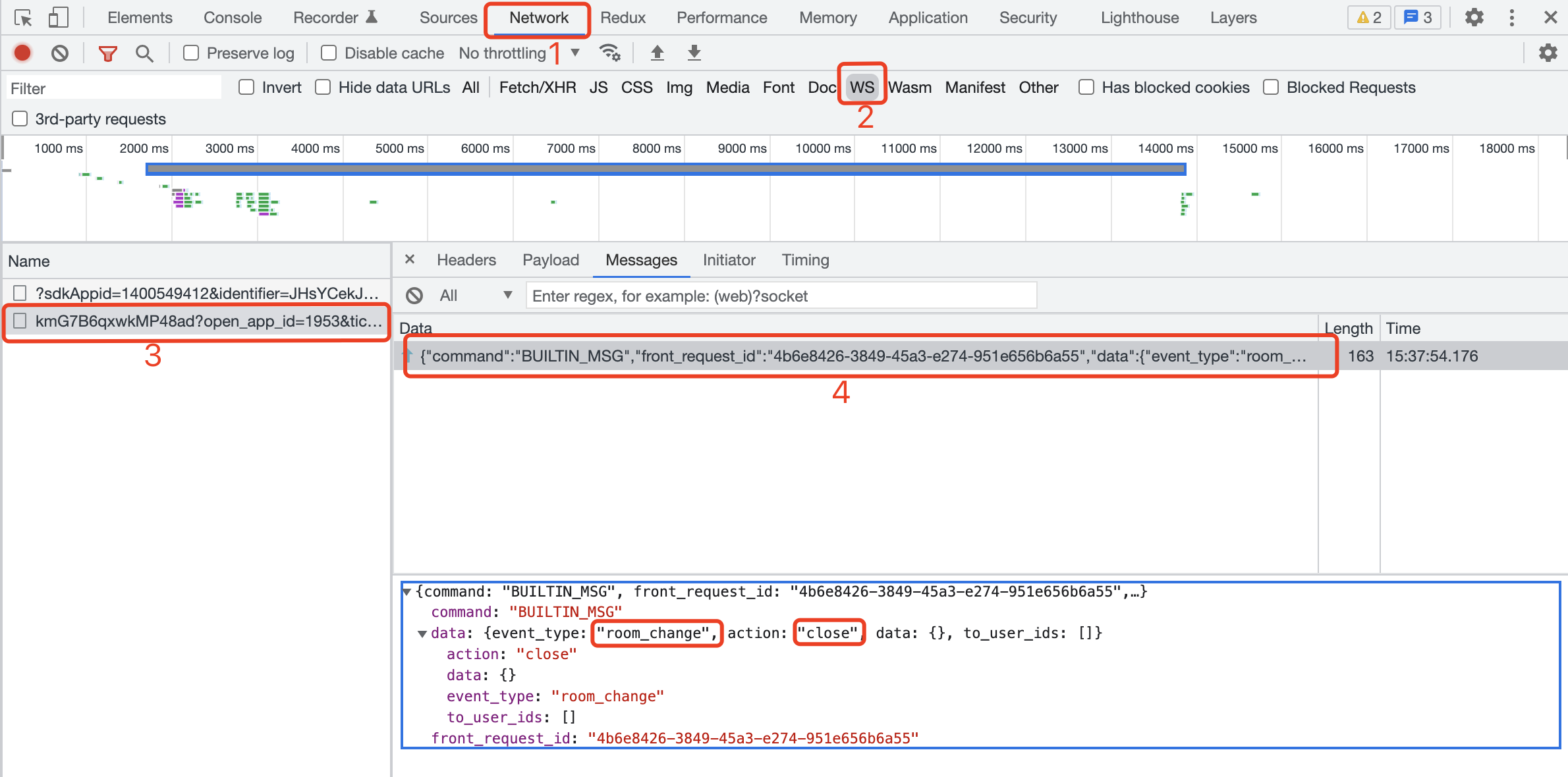
For an active participant exit, successful resolution of live.exit() confirms that the participant left. A BUILTIN_MSG whose event type is room_change and action is close instead indicates that the room owner closed the room.
React Example
This section assumes you are building your application with the React framework.
Call the exit method
Info
Use the useLiveAction hook and call the exit() method to leave the live session.
// highlight-start
import { useLiveAction } from "./LiveReact";
// highlight-end

function ExitBtn() {
  // highlight-start
  const { exit } = useLiveAction();
  // highlight-end

  const handleExit = () => {
    exit().then(() => {
      console.log("Left the live session");
    });
  };

  return <button onClick={handleExit}>Example exit button</button>;
}
Listen for room close
import { BuiltinActionType } from "@realsee/live";
import LiveReact from "./LiveReact";

const { useLiveEventCallback } = LiveReact;

useLiveEventCallback("builtinEvent", (builtinMsg) => {
  switch (builtinMsg.action) {
    // highlight-start
    case BuiltinActionType.RoomClose:
      console.log("__Live room closed__");
      break;
    // highlight-end
    case BuiltinActionType.UserStatus:
      console.log(builtinMsg.data);
      console.log("builtinEvent: user state change");
      break;
    case BuiltinActionType.UserInfo:
      console.log("builtinEven: user info change");
      break;
    case BuiltinActionType.UserMicroStatus:
      console.log("builtinEvent: user micro change");
      break;
    case BuiltinActionType.UserPermission:
      console.log("builtinEvent: user permission change");
      break;
    default: // debug
      console.log("builtinEvent: another change not in the enum!");
      break;
  }
});
Confirm successful exit
Tip
You can also quickly check whether the session was left successfully in the console.
For an active participant exit, successful resolution of exit() confirms that the participant left. A BUILTIN_MSG whose event type is room_change and action is close instead indicates that the room owner closed the room.