
ヒント
このガイドでは音声機能を扱いません。
実際の開発フレームワークに合う例を選んでください。
フレームワークなしの例
ネイティブの js | ts で開発する場合の例です。
Live インスタンスを作成する
import { createLive, LiveState } from "@realsee/live";

const live = createLive({
  __debug__: true, // In this mode, logs are printed to the terminal to make debugging easier. We recommend enabling it during development.
});
作成時に以下の 2 つを設定します:
- url:WebSocket 接続先。生成時または
live.connect({ url })で指定します。 - getTicket():Live ticket を返す非同期コールバック。URL と共に指定し、ticket はバックエンドで取得します。
情報
追加の引数は `@realsee/live@0.7.6` LiveOptions を参照してください。
Live に接続する
生成した live の connect() を適切な時点で呼び、接続を確立します。
live.on("stateChange", (state) => {
  if (state === LiveState.OPEN) {
    console.log("Successfully joined the Live session");
  }
});

const result = await live.connect({
  url: "wss://ws-access.realsee.com/***/?=xxx",
  getTicket: async () => requestTicket(),
});
if (result instanceof Error) throw result;
接続成功を確認する
ヒント
LiveState.OPEN が準備完了の状態です。同期状態を復元・適用するには keyframes を購読します。古い readyKeyframeSync は 0.7.6 で非推奨です。
live.on("keyframes", (keyframes) => {
  if (keyframes.FiveState) {
    setDefaultFiveState(keyframes.FiveState);
  }
});
ヒント
コンソールでも接続成功を確認できます。
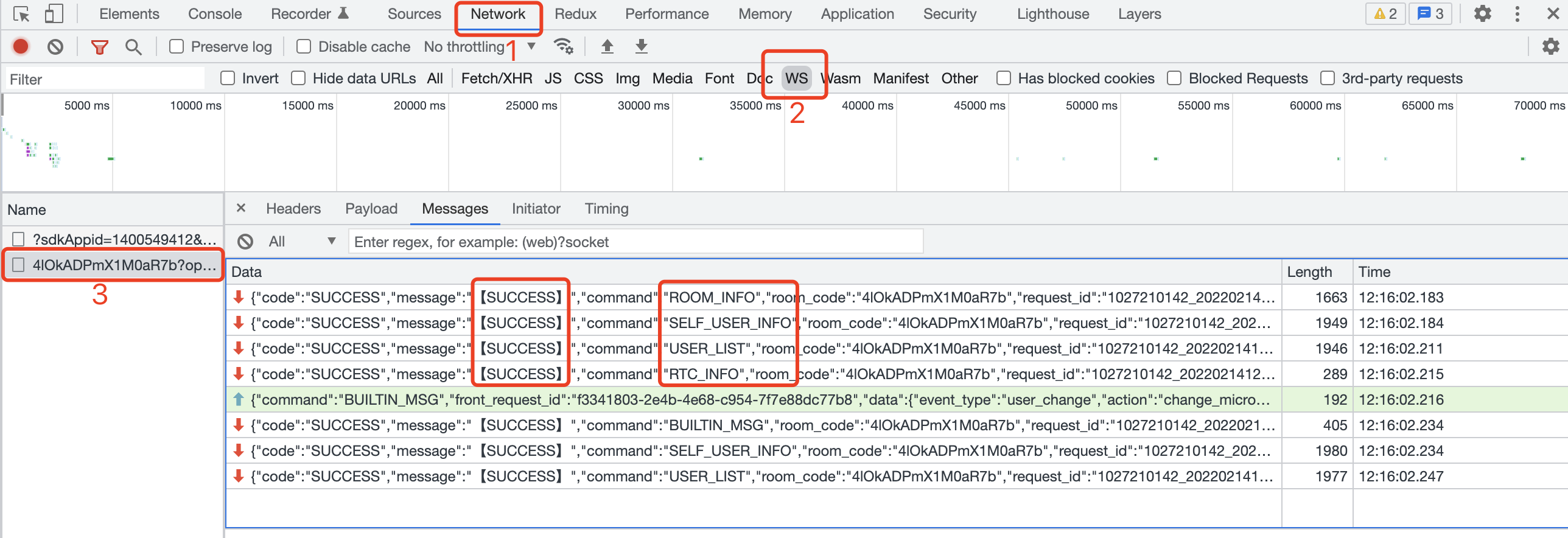
ROOM_INFO、SELF_USER_INFO、USER_LIST、RTC_INFO の 4 命令がすべて SUCCESS の場合、Live チャネルは接続成功です。
React のサンプル
React フレームワークで開発する場合の例です。
Live インスタンスを作成する
情報
LiveReact.js | LiveReact.ts を作り、自分の LiveReact インスタンスを生成します。
import { createLiveReact } from "@realsee/live";

const LiveReact = createLiveReact({
  __debug__: true,
});

export default LiveReact;

/** If you dislike the `LiveReact.LiveProvider` coding style, you can "expose" the functions you need */
// export const LiveProvider = liveReactInstance.LiveProvider
// export const useConnect = liveReactInstance.useConnect
// export const useKeyframe = liveReactInstance.useKeyframe
// export ..import { createLiveReact } from "@realsee/live";
import { Mode } from "@realsee/five";
/** Define the structure of the frame data snapshot */
interface Snapshot {
/** Using the Five state snapshot as an example */
FiveState: {
panoIndex: number;
fov: number;
mode: Mode;
latitude: number;
longitude: number;
};
}
/** Create an instance via the `createLiveReact()` function */
const LiveReact = createLiveReact<Snapshot>({
__debug__: true,
});
export default LiveReact;
/** If you dislike the `LiveReact.LiveProvider` coding style, you can "expose" the functions you need */
// export const LiveProvider = LiveReact.LiveProvider
// export const useConnect = LiveReact.useConnect
// export const useKeyframe = LiveReact.useKeyframe
// export ..コンテキストに組み込む
情報
LiveProvider で live を React の Context に組み込みます。
ReactDOM.render(
  <LiveProvider>
    <App />
  </LiveProvider>,
  document.getElementById("root") // Change this to your container
);ReactDOM.render(
<LiveProvider>
<App />
</LiveProvider>,
document.getElementById("root") // Change this to your container
);Live に接続する
情報
useConnect フックで接続します。
import { useConnect } from "./LiveReact";

function ConnectBtn() {
  // highlight-start
  const connect = useConnect();
  //  highlight-end

  const handleConnect = async () => {
    // highlight-start
    const result = await connect({
      force: true,
      url: wsUrl, // The ws connection is obtained from your backend
      getTicket: async () => {
        // Live ticket callback
        return requestTicket({ roomCode, userId, userRole });
      },
    });
    if (result instanceof Error) throw result;
    //  highlight-end
  };

  return <button onClick={() => handleConnect()}>Live connection example button</button>;
}

const requestTicket = async ({ roomCode, userId, userRole }) => {
  // Call your backend API and return the ticket
  return ""; //  string
};import { useConnect } from "./LiveReact";
function ConnectBtn() {
// highlight-start
const connect = useConnect();
// highlight-end
const handleConnect = async () => {
// highlight-start
const result = await connect({
force: true,
url: wsUrl, // The ws connection is obtained from your backend
getTicket: async () => {
// Live ticket callback
return requestTicket({ roomCode, userId, userRole });
},
});
if (result instanceof Error) throw result;
// highlight-end
};
return <button onClick={() => handleConnect()}>Live connection example button</button>;
}
const requestTicket = async ({
roomCode,
userId,
userRole,
}: {
roomCode: string;
userId: string;
userRole: string;
}) => {
// Call your backend API and return the ticket
return ""; // string
};接続成功を確認する
情報
useLiveState で接続を確認し、useLiveEventCallback("keyframes", ...) で同期状態を復元します。古い readyKeyframeSync は 0.7.6 で非推奨です。
import { useEffect } from "react";
import { LiveState } from "@realsee/live";
import LiveReact from "./LiveReact";

const { useLiveEventCallback, useLiveState } = LiveReact;

function LiveConnectionStatus() {
  const liveState = useLiveState();

  useEffect(() => {
    if (liveState === LiveState.OPEN) {
      console.log("Successfully joined the Live session");
    }
  }, [liveState]);

  useLiveEventCallback("keyframes", (keyframes) => {
    if (keyframes.FiveState) {
      setDefaultFiveState(keyframes.FiveState);
    }
  });

  return null;
}
ヒント
コンソールでも接続成功を確認できます。
ROOM_INFO、SELF_USER_INFO、USER_LIST、RTC_INFO の 4 命令がすべて SUCCESS の場合、Live チャネルは接続成功です。