# Leaving a Live Session
Leave a Live session cleanly after user action or page teardown.
Canonical: https://developer.realsee.ai/docs/live/get-started/live-exit
Source: https://developer.realsee.ai/docs/live/get-started/live-exit.md
Language: en
> **tip**
If the live session includes the voice feature, leaving the session will also disconnect the voice connection by default.
**There are generally two scenarios you need to handle when leaving a live session:**
- **1. The user actively leaves the live room**
To leave the room actively, call and await the `exit()` method. Its Promise resolves after the participant has left successfully.
Any session exit triggered by your application actively calling `exit()` for other business reasons is also considered the user actively leaving the live room.
- **2. The live room is closed**
When the live room is closed, you can listen to the built-in event `builtinEvent` and check whether the returned action is of type `RoomClose` to determine whether the session has ended.
The following sections explain how to handle each of these scenarios in detail.
## Framework-free Example
**This section assumes you are building your application with native `js` | `ts`.**
### 1. Call the exit method
> **info**
Use the `exit()` method to leave the live session.
```js
// With a simple `console.log(live)`, make sure you have actually obtained the `live` instance.
live.exit().then(() => {
console.log("Left the live session");
});
```
### 2. Listen for room close
```ts
import { BuiltinActionType } from "@realsee/live";
live.on("builtinEvent", (builtinMsg) => {
if (builtinMsg.action === BuiltinActionType.RoomClose) {
// The live room is closed; leave the live session
}
});
```
### 3. Confirm successful exit
> **tip**
You can also quickly check whether the session was left successfully in the console.
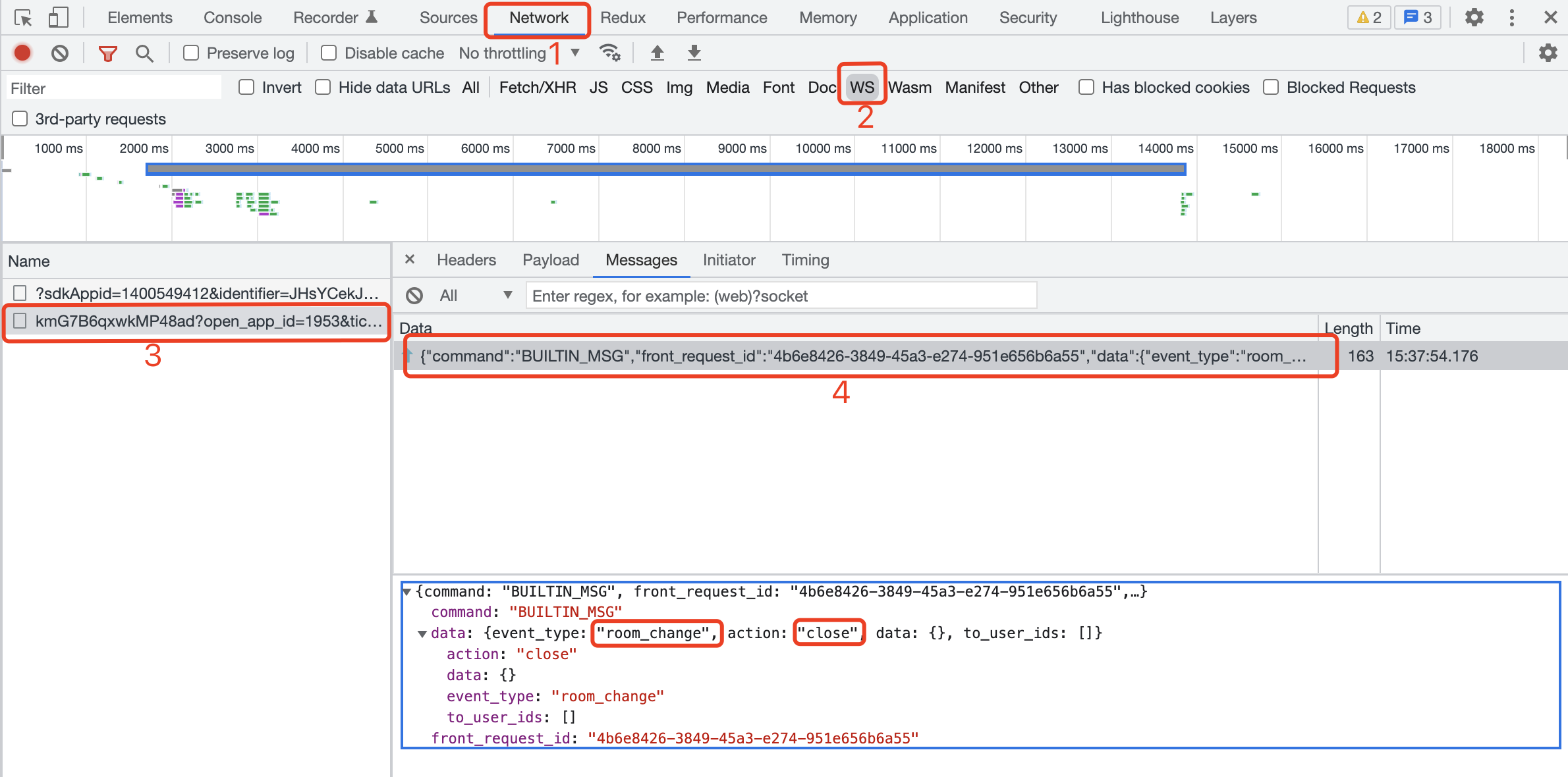
For an active participant exit, successful resolution of `live.exit()` confirms that the participant left. A `BUILTIN_MSG` whose event type is `room_change` and action is `close` instead indicates that the room owner closed the room.
## React Example
**This section assumes you are building your application with the `React` framework.**
### 1. Call the exit method
> **info**
Use the `useLiveAction` hook and call the `exit()` method to leave the live session.
```jsx
// highlight-start
import { useLiveAction } from "./LiveReact";
// highlight-end
function ExitBtn() {
// highlight-start
const { exit } = useLiveAction();
// highlight-end
const handleExit = () => {
exit().then(() => {
console.log("Left the live session");
});
};
return ;
}
```
### 2. Listen for room close
```js
import { BuiltinActionType } from "@realsee/live";
import LiveReact from "./LiveReact";
const { useLiveEventCallback } = LiveReact;
useLiveEventCallback("builtinEvent", (builtinMsg) => {
switch (builtinMsg.action) {
// highlight-start
case BuiltinActionType.RoomClose:
console.log("__Live room closed__");
break;
// highlight-end
case BuiltinActionType.UserStatus:
console.log(builtinMsg.data);
console.log("builtinEvent: user state change");
break;
case BuiltinActionType.UserInfo:
console.log("builtinEven: user info change");
break;
case BuiltinActionType.UserMicroStatus:
console.log("builtinEvent: user micro change");
break;
case BuiltinActionType.UserPermission:
console.log("builtinEvent: user permission change");
break;
default: // debug
console.log("builtinEvent: another change not in the enum!");
break;
}
});
```
### 3. Confirm successful exit
> **tip**
You can also quickly check whether the session was left successfully in the console.

For an active participant exit, successful resolution of `exit()` confirms that the participant left. A `BUILTIN_MSG` whose event type is `room_change` and action is `close` instead indicates that the room owner closed the room.