# VR 状態を同期する — Live
Live のホストと視聴者の間で Five SDK の表示状態を同期します。
Canonical: https://developer.realsee.ai/ja/docs/live/get-started/sync-five-state
Source: https://developer.realsee.ai/ja/docs/live/get-started/sync-five-state.md
Language: ja
> **info**
Live は長時間の全二重 WebSocket 接続を使い、複数クライアントを同じセッションで同期します。メッセージでは **キーフレームデータ** が状態を運びます。ここでは VR 表示の同期を説明します。
**ホストと視聴者の少なくとも 2 つの役割を準備してください。**
Five SDK の状態取得・設定を理解していることを前提とします。
## フレームワークなしの例
**JavaScript**
```jsx
five.on("stateChange", (state, userAction) => {
// Listen for changes to the local Five state
if (userAction) {
// Send only Five state changes triggered by user actions
// Send the local keyframe data (Five State)
live.sendKeyframe("FiveState", state);
}
});
// Receive remote keyframe data (Five State)
live.keyframes.on("FiveState", (newState, prevState) => {
// Use the latest `newState` to update the local UI state
five.setState(newState, false, false); // Set userAction to false to avoid an infinite sync loop.
});
```
**TypeScript**
```tsx
five.on("stateChange", (state, userAction) => {
// Listen for changes to the local Five state
if (userAction) {
// Send only Five state changes triggered by user actions
// Send the local keyframe data (Five State)
live.sendKeyframe("FiveState", state);
}
});
// Receive remote keyframe data (Five State)
live.keyframes.on("FiveState", (newState, prevState) => {
// Use the latest `newState` to update the local UI state
five.setState(newState, false, false); // Set userAction to false to avoid an infinite sync loop.
});
```
> **tip**
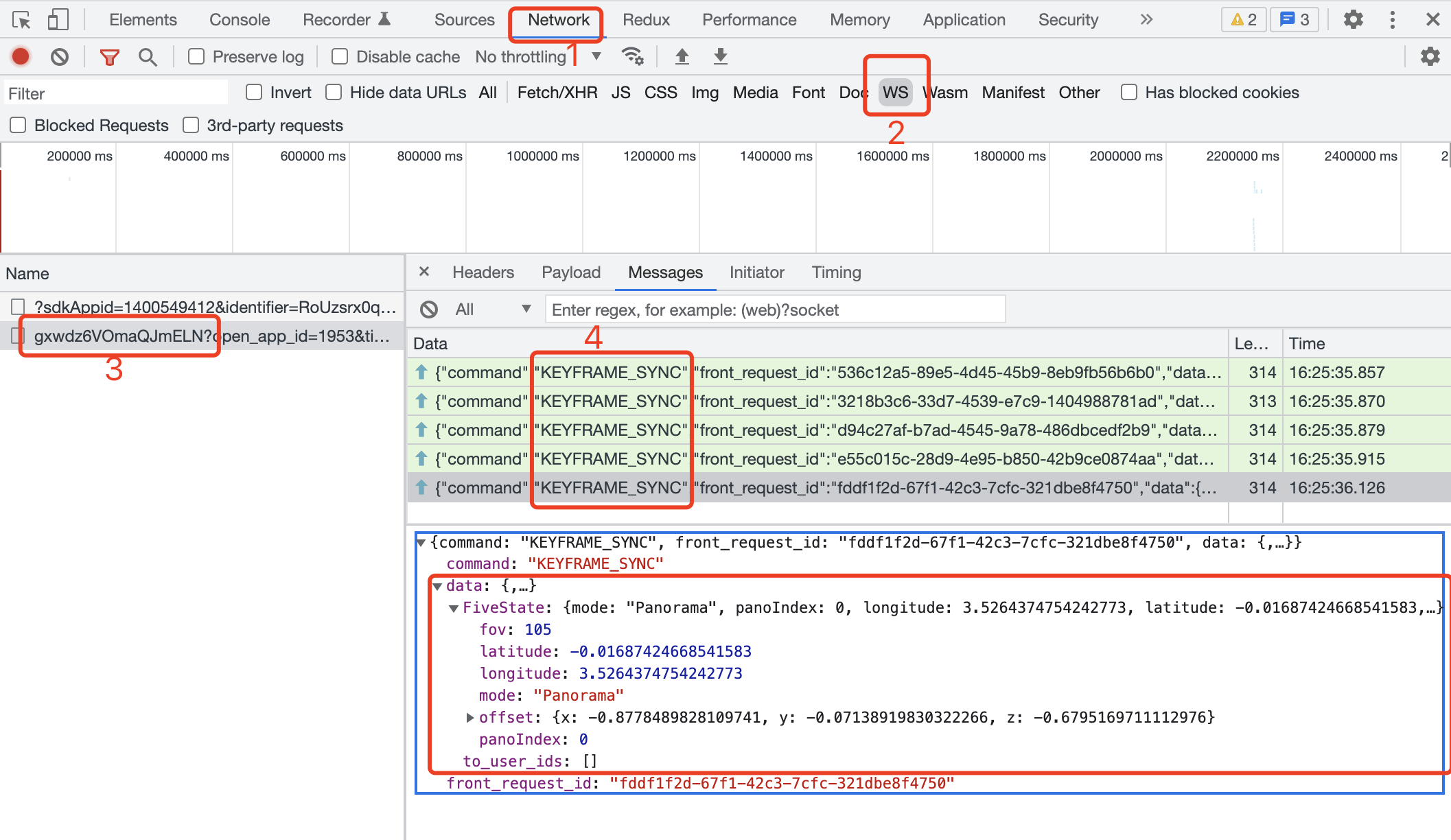
`host` で VR を操作し、コンソールの Network で ws 通信を確認します。
ホストの表示変更に伴い `KEYFRAME_SYNC` が継続して送信されます。命令を選び、送信データを確認できます。
> **tip**
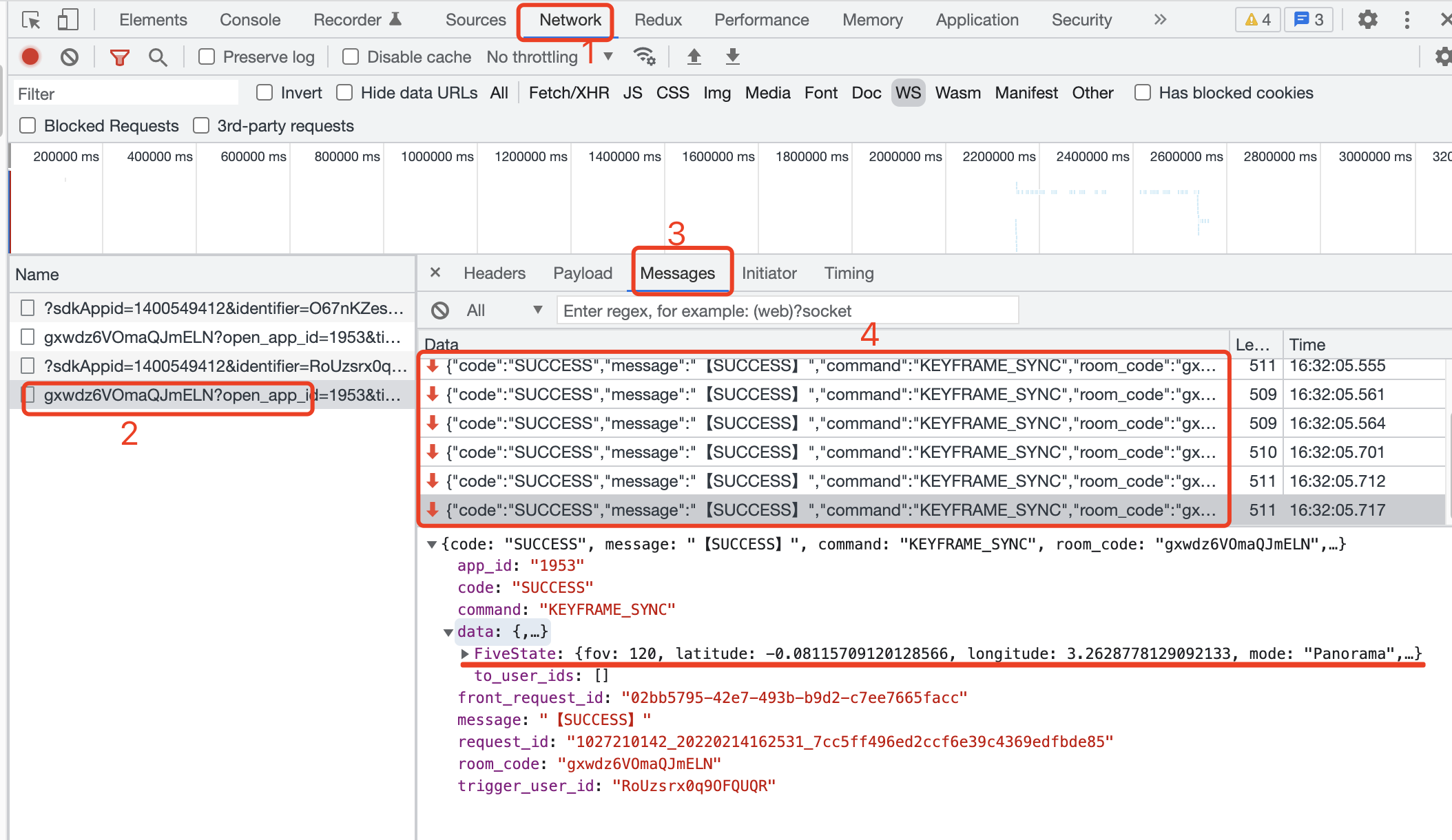
同時に `viewer` のコンソールで Network の ws 通信を確認します。
ホストの操作に伴い `KEYFRAME_SYNC` を受信します。命令を選んで受信データを確認できます。
> **tip**
送信は緑の上向き矢印、受信は赤の下向き矢印で表示されます。
## React のサンプル
**JavaScript**
```jsx
import LiveReact from "LiveReact";
import { useFiveState } from "@realsee/five/react";
const { useKeyframe } = LiveReact;
function Test() {
const [fiveState, setFiveState] = useFiveState();
const [fiveStateKeyframe, setFiveStateKeyframe] = useKeyframe("FiveState");
// Listen for Five state changes and send keyframe data
useFiveEventCallback("stateChange", (state, userAction) => {
// Send only the state changes triggered by the user
if (userAction) {
setFiveStateKeyframe(state);
}
});
// Receive keyframe data
/*
* In `const [fiveStateKeyframe, setFiveStateKeyframe] = useKeyframe('FiveState')`,
* the useKeyframe() hook already keeps the real-time keyframe data updated, so
* `fiveStateKeyframe` is always the latest Five state keyframe.
* Therefore, receiving keyframe data only requires diffing the value of the
* first parameter returned by the useKeyframe() hook and then updating the local UI.
* Here you only need to watch for changes to `fiveStateKeyframe` and then update the Five state.
* */
React.useEffect(() => {
// Reaching this point means `fiveStateKeyframe` has changed.
setFiveState(fiveStateKeyframe, false, false); // Set userAction to false for the synced state change to avoid an infinite sync loop.
}, [fiveStateKeyframe]);
return null;
}
```
**TypeScript**
```tsx
import LiveReact from "LiveReact";
import { useFiveState } from "@realsee/five/react";
const { useKeyframe } = LiveReact;
function Test() {
const [fiveState, setFiveState] = useFiveState();
const [fiveStateKeyframe, setFiveStateKeyframe] = useKeyframe("FiveState");
// Listen for Five state changes and send keyframe data
useFiveEventCallback("stateChange", (state, userAction) => {
// Send only the state changes triggered by the user
if (userAction) {
setFiveStateKeyframe(state);
}
});
// Receive keyframe data
/*
* In `const [fiveStateKeyframe, setFiveStateKeyframe] = useKeyframe('FiveState')`,
* the useKeyframe() hook already keeps the real-time keyframe data updated, so
* `fiveStateKeyframe` is always the latest Five state keyframe.
* Therefore, receiving keyframe data only requires diffing the value of the
* first parameter returned by the useKeyframe() hook and then updating the local UI.
* Here you only need to watch for changes to `fiveStateKeyframe` and then update the Five state.
* */
React.useEffect(() => {
// Reaching this point means `fiveStateKeyframe` has changed.
setFiveState(fiveStateKeyframe, false, false); // Set userAction to false for the synced state change to avoid an infinite sync loop.
}, [fiveStateKeyframe]);
return null;
}
```
> **tip**
`host` で VR を操作し、コンソールの Network で ws 通信を確認します。
ホストの表示変更に伴い `KEYFRAME_SYNC` が継続して送信されます。命令を選び、送信データを確認できます。

> **tip**
同時に `viewer` のコンソールで Network の ws 通信を確認します。
ホストの操作に伴い `KEYFRAME_SYNC` を受信します。命令を選んで受信データを確認できます。

> **tip**
送信は緑の上向き矢印、受信は赤の下向き矢印で表示されます。